Wednesday, 20 November 2013
Prevention of hackingTo prevent major hacking, which is unauthorised access to a computer or a computer network, you can keep your passwords safe, make them secure and hard to obtain, use plenty of different characters and numbers when making a password, also update your password regularly. Keep your anti-virus up to date also and make sure it's trusted. Norton is a good choice, shredding personal details will also help, using a cross shredder for extra security is a good choice. The user name and password should not have your name in it at all. An advantage of this is so you will not lose any personal data that may be very important to you. A disadvantage of this is the cost of the software, and the time you spend preventing hacking.Viruses
Viruses are a malicious program that attack your computer, these can get onto your computer without the user realising it. To remove a virus and to protect against them. Make sure you have a firewall up and running and that is trusted and have an anti-virus installed. I recommend to use the stateful filter as it check against a secure database of info. Norton is the best anti-virus to use. This should be ran every night when on hibernate, so it does not interfere with work. Free versions are also available and then you can update for a fee. An advantage of the software is it prevents data corruption and minimizes authorisation into the system. A disadvantage to this is the fee of the pro versions of the software, and you will have to constantly update the software.Firewall on site performanceThis is a barrier that protects your computer from hackers and offensive websites, there are 3 different methods, Packet filtering, proxy and stateful. High security blocks everything. I would recommend you set the firewall at medium to high level so it lets through info, but block out proxies and hacking. I would recommend Windows defender firewall as it is free. The advantage of having a firewall is it helps to protect your system by filtering unauthorised access and websites that may not be safe. An disadvantage to this is that if set to a high level, the firewall will filter too many things, prevent access and also slows traffic down when checking the files.Identity theft This occurs when personal details are taken from somebody and these details are used fraudulently. You can prevent this by using strong passwords, by checking https, check statements and shred papers containing details. I would recommend protecting against this by not using names or personal data in usernames/passwords. Shredding documents is also a good option, try not disclose any personal info also. Different levels to servers. An advantage of preventing this is that your details will remain safe and you will keep your money protected. A disadvantage to this is it will take more time, and you will have to constantly change passwords and perform security updates. The cross shedding method will also cost money.RSA CertificatesRSA Certificates are an encrypted link that's between the client and server. For example a webserver and browser, or a mailing service and a mail client. Data is via certificates for private and public key pairs. I recommend setting up the bit encryption as high as possible, the more bits, the more scrambling thus making this harder to hack. Make sure your Certificate is updated and protected. An advantage to these certificates is that they act as a private and public key. this will make your data a lot safer. A disadvantage to this, is you will need the SSL to be paired up, and you will also have to have a private and public key.SSLSSL is a authentic encryption for the internet, it uses an algorithm. Public and private key pairs are also used for SSL, the private key decrypts from the public, and the private is used to encrypt. Advantage of SSL is that it makes your packet data safer, on the other hand, the disadvantage being that it will have to travel through a specific port, and this will take longer.
Alternative Authentication MethodsThese are a device which can be used electronically to prove somebody's ID, this could be fingerprint, signature, key, pin or random number. These use encryption and decryption. The advantage to this is there is much less chance of somebody being able to use your fingerprint. The disadvantage to these methods is the cost involved, as these methods will cost more than regular methods and are more time consuming.Strong PasswordsA strong password should contain at least 8 characters, with no ID info. The password should idealy have numbers in it also, maybe symbols and lower-case and capital letters to keep it very secure. A advantage to having a strong password is there is less chance of the account you own being hacked into. The disadvantage to this is having to remember your password.HTTPSHTTPS is a protocol, this uses port 443 as opposed to 80. This handles page requests and info from browser to server, using encryption. The name indicates a secure session. Important to log out afterwards, especially on a public computer. An advantage to having a HTTPS it is ideal for your order page and banking details, and it stops people from hacking the site. The disadvantage of HTTPS is it will take longer and you will have to use a password to access the information.

Thursday, 3 October 2013
Bitmap and Vector images
Raster (Bitmap)
Lossy Compression
Refers to data compression techniques in which some amount of data is lost. Lossy compression technologies attempt to eliminate redundant or unnecessary information. Most video compression technologies, such as MPEG, use a lossy technique. 

Lossless Compression
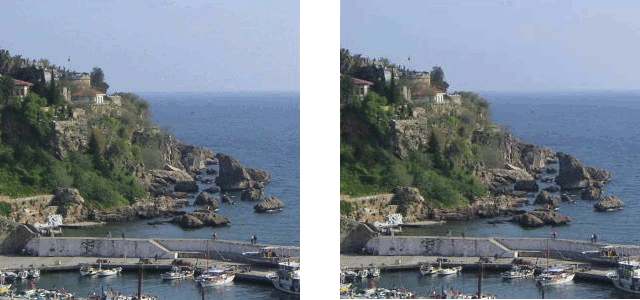
Refers to data compression techniques in which no data is lost. The PKZIP compression technology is an example of lossless compression. For most types of data, lossless compression techniques can reduce the space needed by only about 50%. For greater compression, one must use a lossy compression technique. Note, however, that only certain types of data -- graphics, audio, and video -- can tolerate lossy compression. You must use a lossless compression technique when compressing data and programs. The picture below shows an example of lossless compression, the image quality does not seem to decrease when using this method, and the pixels are kept the same as before. Lossless compresson does not delete 'bad' pixels. Reference: http://imrannazar.com/content/img/compression-jpeg-photo.gif

Pixel
Short for Picture Element, a pixel is a single point in a graphic image. Graphics monitors display pictures by dividing the display screen into thousands (or millions) of pixels, arranged in rows and columns. The pixels are so close together that they appear connected. Raster images are made up of pixels, each a different colour, arranged to display the whole image, including the depth and shading. The picture below is a pixelated, this is caused by the pixels being too large, and there is not enough bit depth, this gives the picture a 2D 'block' effect. Reference: http://static2.wikia.nocookie.net/__cb20120828222222/fantendo/images/0/08/Pixel-mario.gif

File Extensions
There a lot of file extensions for raster images such as bmp, png, gif, tiff, jpg or psd. When you save a gif image it compresses the image. If you save a png image it will compress the image. When you flatten the image you lose layers within the image. A png image is the best to use for a webpage as it loads a lot quicker than other file types.
Vector's are images that are made up mathematically using many various shapes, these are the shapes used to make a vector image:
- Points - Angle of a line which can change the size or shape.
- Lines - these are solid srokes of different widths
- Curves - lines that are created to have an angle, create smoother effect.
- Polygon - 5 sided shape which can be modified to create circles, stars etc

For vector images, there are a few different types of file extensions, these are EPS (Encapsulated PostScript) AI (Adobe Illustrator) and FLA (Adobe Flash)
Bit Depth and colour spaceimage files are made up of 'bits' these are computer words which are either 0 or 1. there are 8 bits that create byte. Each pixel has one of these computer words that assigns the pixel's colour and the pixel's mapped location, this is why the image is referred to as 'bitmapped'. There are two main different colour spaces, these are RGB and CMYK, RGB stands for RED, BLUE, GREEN, where as CMYK stands for CYAN, MAGNETA, YELLOW, and the K stands for BLACK. YUV, this is a colour space that allows reduced bandwidth for chrominance and HSV, this stands for HUE, SATURATION, LIGHTNESS. T

The picture above shows the colour space map, showing the relationship between RGB for screen colours, and CMYK for printed colours. RGB creates white, where as CMYK creates black. reference: http://upload.wikimedia.org/wikipedia/commons/3/33/Adobergb-in-cielab.png
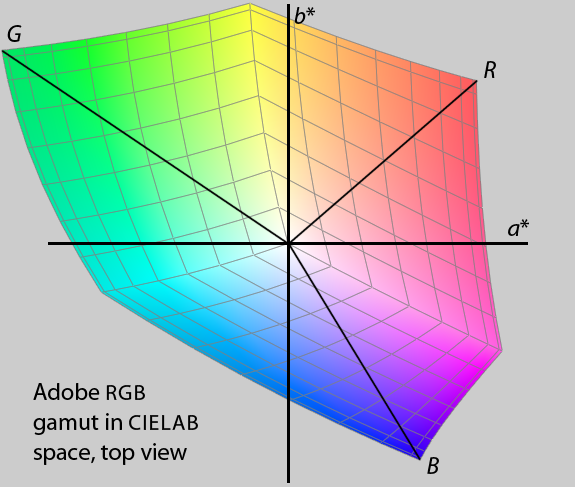
Image Capture
 Image capture is using a device that has the ability to capture images, there are a range of different devices that can do so, like a scanner, mobile, a camera. Mobiles can only be used if they have a functioning. The resolution of a captured images the pixels per inch. The storage of the image refers to the memory that the file takes up.
The picture to the right is a scanned image from a printer scanner, the image is in a .jpg file extension, the photo has a high resolution, you can choose the resolution when scanning. The file is 678x1000 pixels resolution. The file is 137kb.
Optimising
Optimising is making sure an image is the best it can be for what it will be used for. This means changing the size, dimensions and resolution of the image, images can be used for meant things, such as a document, presentation, or a website.
The image below shows the save for web option in Photoshop, this is used for optimising your image.

Thursday, 26 September 2013
Different types of multimedia
 Navigation Bar
A navigation bar is a user interface element within a webpage that contains links to other sections of the website. In most cases, the navigation bar is part of the main website template, which means it is displayed on most, if not all, pages within the website. This means that no matter what page you are viewing, you can use the navigation bar to visit other sections of the website.
Navigation Menu
The Navigation menu is basically a drop down menu located
on the Navigation bar. When you hover over the navigation bar a drop down menu
would appear and a variety of buttons will become accessible.
Navigation Rollover
Navigation Rollover
Animated GIFs

Logos are used for the visual or graphical
representations of businesses. They brand businesses and can help in the
identification of a brand position in the mind of people. Logos also create a
concept that encapsulates the ideal or flavour of what businesses represent.
Logos are also used by companies and organisations to promote instant public
recognition. A logo uniquely identifies the company to the customer as well as
setting it apart from other businesses.
Screen Icons
An icon, is a picture which usually stands for a computer program, computer file, folder, or an action for a program to do. Icons are usually small pictures, but not always. Sometimes the user can change what size an icon is.
BackgroundsOn your screen, located on a website, these go behind the content. They could be flat colour images, gradients, images or anything that you want, to add interest to the website.
Texture Graphics

This adds interest to a website or a game because it creates realism and a mood.
Wednesday, 25 September 2013
Advantages and Disadvantages of eCommerce.
Advantages
Global marketplace - With a global marketplace, this means that the organisation offering ecommerce to customers can make the online store available to people from around the whole world, and offer shipping to them, maybe for a extra fee. This is an advantage as anybody, providing they have a internet connection, can purchase from the ecommerce store, and including the shipping fee, this will bring in more profit for an organisation.
24/7 Trading - Having an online store means that it is accessible 24 hours a day, 7 days a week, this means at any point a customer can purchase from the store, so if they went to a physical store, it could be closed. This means more customers will purchase online whenever they can, making more money for an organisation.
Low start up and running costs - If an ecommerce online shopping system is created, it does not take much money to begin for the customers, and to keep it up and running does also not cost much money. Where as in a physical store an organisation would have to pay workers money for operating tills and whatever other tasks they are assigned to do.
Gathering customer info - When customers use an online shopping system, they will be required to enter in personal details, including location details, this then means the organisation will have this information to use in the future. Whether it be to post letters and leaflets through the letterbox, or to just remember in general for the next time a customer uses the service. Also, the card and payment details will be stored for future use.
Money - ecommerce generates lots of money for the company that uses the service, as many people would prefer to shop online, and most companies will offer products at a more expensive price online, they also add a delivery fee a lot of the time, making more money than somebody shopping in store.Disadvantages
Money - Money is some cases could be used as a disadvantage, as having a website for ecommerce professionally designed could cost quite a bit of money. The charity relies on donations, so it will not be able to afford a professional website. You could use a template website, this will be cheaper, although it would not be original and would not look professional.
Staff - A company will need plenty of staff to keep up with the website and to make sure its maintained, these members of staff will need to be expertise and be familiar with everything. This will take time and will require suitable training.
Website - If the website was to crash/go down, then no one would be able to access it and purchase things, leading to a loss in money. The charity would then have no income from the website, forcing them to rely on the shops.
Online security - The web is a dangerous place, many fraudsters and hackers are about and they could target a ecommerce website, leading to serious consequences. Data could be stolen from the charity, money could be taken and the reputation could be damaged.
Server - A ecommerce website will need to be fairly big so it can host many people on there at one time, this server will also cost money to set up and run. Servers can get DDOS attacks, forcing the server to shut down and get hacked.
Wednesday, 4 September 2013
eCommerce Technologies.
Introduction
ecommerce is using online services/websites to purchase items or purchase downloadable items over the internet or other electronic systems, below is a list of hardware, software and other things you or a business will need to create a successful ecommerce website/service.

Web authoring tools.
Web authoring tools are applications you can usually find/get for your computer, that are used for creating a website. Two good examples of these are 'notepad, which comes with the windows operating system. This can be used to create a website by typing the text as HTML and saving it as '.HTML' another piece of authoring web software is Adobe Dreamweaver, this is much easier to use.
Storage sizeStorage size, is the amount of data on a hard drive disk or even in webspace/on a webserver. The more space/storage you have on a webserver, the more tools used for ecommerce your website can contain, and the faster it will be. This could also allow more people to use a service that you are providing.

Domain nameThe domain name is the address for your website, which is entered into the search bar to make the website visible. This is paid for so you can have your own custom one, making it easier to access/remember. For example, this website 'Blogger.com' tells you that it is a blogging website and its available worldwide. That is what the '.com' part of the address means.
PlatformThe platform used is the operating system used to access the website and ecommerce, operating systems like: Windows, Linux and Mac. Some platforms are more secure than other ones. Such a Linux.
Database SystemsA database system is often used in ecommerce, for example, when an item is purchased, the information of the customer could be put into a database for research purposes, or simply for future reference. Information will also be taken about the purchased item and its cost etc. I would recommend Microsoft Access as it is included with the office suite and will not cost any more money.
Web browserA web browser is the application used for browsing the internet, some are faster than others, some are more secure, and some are better overall. Popular web browsers are ones like: Google Chrome, Mozilla Firefox, Internet Explorer and Safari. These will display the HTML content as readable pages.
 Download speedsDownload speeds will be a big factor when using ecommerce, the slower your download speed, the harder it will be to access the website in due time, also if purchasing something online that requires you to download it, a faster download speed would be recommended. Faster download speeds will allow you to access the correct webpage faster, you would be able to download faster, and everything on the webpage would load faster, bad download speed/internet could completely ruin the transaction.
Web server
Web server is the hardware and software using on the webpage, or what's using to host the website, this is saved as HTTP, which is a web-server. Web servers also handle errors and report faults. They are protected behind a firewall.
NetworkingNetworking is the exchange of data between computers basically, the connection is made through a wireless connection/wireless media, or through connected connection/connected media, in ecommerce, there is likely to be a computer that obtains the information you send when purchasing something. TCP is transmission control protocol and this sends and receives packets of data between applications. Where as IP is internet protocol, and is the communication between computers. There are different port numbers where the data goes through, two of these are Port 25 which routes the mail. And then port 80 routes the website data.
ecommerce is using online services/websites to purchase items or purchase downloadable items over the internet or other electronic systems, below is a list of hardware, software and other things you or a business will need to create a successful ecommerce website/service.

Web authoring tools.
Web authoring tools are applications you can usually find/get for your computer, that are used for creating a website. Two good examples of these are 'notepad, which comes with the windows operating system. This can be used to create a website by typing the text as HTML and saving it as '.HTML' another piece of authoring web software is Adobe Dreamweaver, this is much easier to use.
Storage sizeStorage size, is the amount of data on a hard drive disk or even in webspace/on a webserver. The more space/storage you have on a webserver, the more tools used for ecommerce your website can contain, and the faster it will be. This could also allow more people to use a service that you are providing.
Domain nameThe domain name is the address for your website, which is entered into the search bar to make the website visible. This is paid for so you can have your own custom one, making it easier to access/remember. For example, this website 'Blogger.com' tells you that it is a blogging website and its available worldwide. That is what the '.com' part of the address means.
PlatformThe platform used is the operating system used to access the website and ecommerce, operating systems like: Windows, Linux and Mac. Some platforms are more secure than other ones. Such a Linux.
Database SystemsA database system is often used in ecommerce, for example, when an item is purchased, the information of the customer could be put into a database for research purposes, or simply for future reference. Information will also be taken about the purchased item and its cost etc. I would recommend Microsoft Access as it is included with the office suite and will not cost any more money.
Web browserA web browser is the application used for browsing the internet, some are faster than others, some are more secure, and some are better overall. Popular web browsers are ones like: Google Chrome, Mozilla Firefox, Internet Explorer and Safari. These will display the HTML content as readable pages.
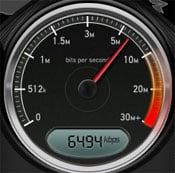 Download speedsDownload speeds will be a big factor when using ecommerce, the slower your download speed, the harder it will be to access the website in due time, also if purchasing something online that requires you to download it, a faster download speed would be recommended. Faster download speeds will allow you to access the correct webpage faster, you would be able to download faster, and everything on the webpage would load faster, bad download speed/internet could completely ruin the transaction.
Web server
Web server is the hardware and software using on the webpage, or what's using to host the website, this is saved as HTTP, which is a web-server. Web servers also handle errors and report faults. They are protected behind a firewall.
NetworkingNetworking is the exchange of data between computers basically, the connection is made through a wireless connection/wireless media, or through connected connection/connected media, in ecommerce, there is likely to be a computer that obtains the information you send when purchasing something. TCP is transmission control protocol and this sends and receives packets of data between applications. Where as IP is internet protocol, and is the communication between computers. There are different port numbers where the data goes through, two of these are Port 25 which routes the mail. And then port 80 routes the website data.
Subscribe to:
Comments (Atom)