Raster (Bitmap)
Lossy Compression
Refers to data compression techniques in which some amount of data is lost. Lossy compression technologies attempt to eliminate redundant or unnecessary information. Most video compression technologies, such as MPEG, use a lossy technique. 
Lossless Compression
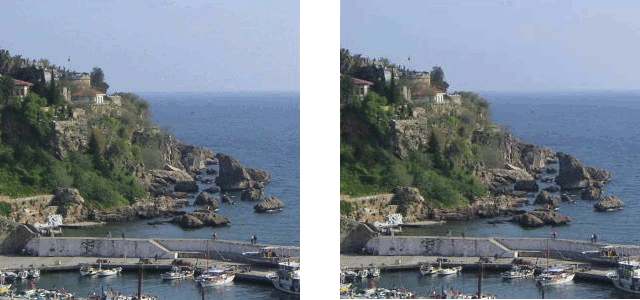
Refers to data compression techniques in which no data is lost. The PKZIP compression technology is an example of lossless compression. For most types of data, lossless compression techniques can reduce the space needed by only about 50%. For greater compression, one must use a lossy compression technique. Note, however, that only certain types of data -- graphics, audio, and video -- can tolerate lossy compression. You must use a lossless compression technique when compressing data and programs. The picture below shows an example of lossless compression, the image quality does not seem to decrease when using this method, and the pixels are kept the same as before. Lossless compresson does not delete 'bad' pixels. Reference: http://imrannazar.com/content/img/compression-jpeg-photo.gif

Pixel
Short for Picture Element, a pixel is a single point in a graphic image. Graphics monitors display pictures by dividing the display screen into thousands (or millions) of pixels, arranged in rows and columns. The pixels are so close together that they appear connected. Raster images are made up of pixels, each a different colour, arranged to display the whole image, including the depth and shading. The picture below is a pixelated, this is caused by the pixels being too large, and there is not enough bit depth, this gives the picture a 2D 'block' effect. Reference: http://static2.wikia.nocookie.net/__cb20120828222222/fantendo/images/0/08/Pixel-mario.gif

File Extensions
There a lot of file extensions for raster images such as bmp, png, gif, tiff, jpg or psd. When you save a gif image it compresses the image. If you save a png image it will compress the image. When you flatten the image you lose layers within the image. A png image is the best to use for a webpage as it loads a lot quicker than other file types.
Vector's are images that are made up mathematically using many various shapes, these are the shapes used to make a vector image:
- Points - Angle of a line which can change the size or shape.
- Lines - these are solid srokes of different widths
- Curves - lines that are created to have an angle, create smoother effect.
- Polygon - 5 sided shape which can be modified to create circles, stars etc

For vector images, there are a few different types of file extensions, these are EPS (Encapsulated PostScript) AI (Adobe Illustrator) and FLA (Adobe Flash)
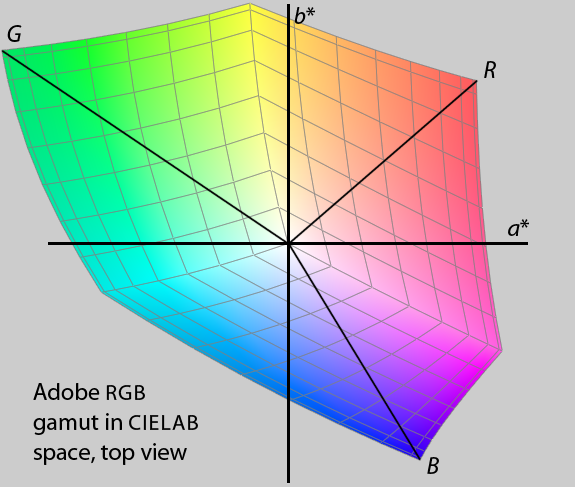
Bit Depth and colour spaceimage files are made up of 'bits' these are computer words which are either 0 or 1. there are 8 bits that create byte. Each pixel has one of these computer words that assigns the pixel's colour and the pixel's mapped location, this is why the image is referred to as 'bitmapped'. There are two main different colour spaces, these are RGB and CMYK, RGB stands for RED, BLUE, GREEN, where as CMYK stands for CYAN, MAGNETA, YELLOW, and the K stands for BLACK. YUV, this is a colour space that allows reduced bandwidth for chrominance and HSV, this stands for HUE, SATURATION, LIGHTNESS. T

The picture above shows the colour space map, showing the relationship between RGB for screen colours, and CMYK for printed colours. RGB creates white, where as CMYK creates black. reference: http://upload.wikimedia.org/wikipedia/commons/3/33/Adobergb-in-cielab.png
Image Capture
 Image capture is using a device that has the ability to capture images, there are a range of different devices that can do so, like a scanner, mobile, a camera. Mobiles can only be used if they have a functioning. The resolution of a captured images the pixels per inch. The storage of the image refers to the memory that the file takes up.
The picture to the right is a scanned image from a printer scanner, the image is in a .jpg file extension, the photo has a high resolution, you can choose the resolution when scanning. The file is 678x1000 pixels resolution. The file is 137kb.
Optimising
Optimising is making sure an image is the best it can be for what it will be used for. This means changing the size, dimensions and resolution of the image, images can be used for meant things, such as a document, presentation, or a website.
The image below shows the save for web option in Photoshop, this is used for optimising your image.